Showing posts with label Miscellaneous Stuff. Show all posts

Saturday, November 22, 2025

A Tentative Return

     A couple years ago, I became so thoroughly fed-up with all things Minetest that I had to put Minetest down and just walk away.

     Time has passed.

     For the past few weeks, I've been thinking about Minetest. The slowly regrowing urge to build again seems to be at the root of my curiosity.

     Perhaps the burnout has finally healed?

     So,... I poked around a bit to get a sense of what direction things have gone in Minetest since I left. It didn't take long for my old frustrations to flare up again.

     Ugh...

     I don't want to get burned-out again before I even start to resume with Minetest, so I'll leave those issues lye and try to move on.

         ("Lord, grant me the serenity to accept the things I cannot change,"...)

     Perhaps during this next go-round, I can do a better job of teaching myself Lua?

         ("the strength to change the things I can,"...)

     Whatever issues Minetest — now Luanti — has, they just aren't worth my time; not anymore. I can be quite contented with stacking simple blocks to create stuff in my singleplayer worlds.

         ("and the wisdom to know the difference.")


About Comments:

     Be civil and show some class toward your fellow commenters.
     Trolls will be ignored as will posts containing swear-words or alternate spellings of swear words.

Sunday, June 4, 2023

Random Thoughts 2023-06-04

     I read that Google will be purging accounts of anything that has been inactive for more than two years. When I checked my Minetest blog the last post was in 2017.

     Two things:

  1. Yup, better get something posted.
  2. It's really been that long!?

     Well,... back then I was unemployed and had a lot of time on my hands. More often than not I miss those days. My health and peace of mind were much better back then. The rat-race of employment takes a heavy toll on a person.

     I still putter in my single-player world, "U4EA" (euphoria); put on some chill tunes, relax, and escape the insanities of real life for a while.

     Creating blog posts were very time consuming. Thinking of what to write, condensing notes into concise and coherent content; setting up screenshots, cropping, resizing, condensing; then reviewing it all and work through several edits before posting only to come back days layer and see mistakes with refreshed eyes followed by another round of edits.

     On that note...


Condense Your Images Before Posting

     Yes, we live in a day and age of high-speed Internet, wide-screen monitors, and powerful desktop computers but the most used device for frequently accessing the Internet is the smartphone. In comparison to the desktop gear, smartphones have tiny screens, wimpy processors, dinky amounts of RAM, and if you don't have access to WiFi you are stuck in the hell that is slow and spotty cellular service (at least here in the US).

     800px x 600px at 72dpi is good enough for most images. If the image is of the realistic sort, use the jpg file format. If the image is from a chunky, blocky game like Minetest, use the png file format.

     It may take several attempts using different compression levels in jpg or png formats to find the sweet spot between the amount of compression and the rendered quality of the image. After a few times you develop a feel for what settings work for what type of image is compressed.

     "GIMP" is a good, free, photo editor for Windows and Linux (not sure if it works for Mac).

     "Compress jpeg, png: Reduce image size" is the free app I use on my Android smartphone.


Perspective and Proportion

     One of the challenges of building in Minetest is interpreting your perspective and sense of proportion of the real world and translating that into the perspective and proportions of Minetest worlds.

     In Minetest everything is based on the dimension of 1 x 1 x 1 cubical space. Even the smallest, thinnest panel occupies a full 1 x 1 x 1 cubical space -- nothing else can occupy that space at the same time.

     This can be useful in some build-design tricks but more often than not it is a frustrating fact of builing in Minetest that you can't put stuff close together like you can in real life.

     To work around this means having to make compromises and sacrifices in how you assemble your builds and then relying on the viewers' imagination to fill in where Minetest won't allow stuff to be put.

     To build in Minetest with real life proportions would result in creations so massive that Minetest wouldn't be able to load all of the world chunks for viewing at a distance. The Minetest character would be like a tiny ant in a pro-sports stadium.

     To help adjust your perspective from the real world to a Minetest world and give you a better sense of proportion of your build to the player character stack two blocks, one on top of the other, to create a mannequin. Two blocks high is roughly the height and width of a Minetest character ("Sam"). Since the default "Sam" has blue pants and a green shirt, I stack a green wool block on top of a blue wool block. Then I place one of these wool mannequins in each room and at least one outside to get a better feel for how big or small to make stuff.


     I'll leave things here and save the rest of my thoughts and scribbled notes for future posts.


About Comments:

     Be civil and show some class toward your fellow commenters.
     Trolls will be ignored as will posts containing swear-words or alternate spellings of swear words.

Thursday, December 31, 2015

My Thoughts on Minetest Texture Packs

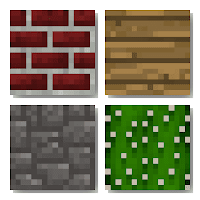
A group of four, default, Minetest textures - brick, wood, stone, and cactus.
 ~ Minetest Textures ~
I keep a variety of texture packs installed in my Minetest clients because it is neat to see how much they can change the look of things in Minetest and could suit the build mood I was in at the time.

When I felt like creating something medieval looking, the JohnSmith texture pack was perfect. For modern builds, VanessaE's HDX-64 texture pack fit the bill. For general purpose building, the Misa texture pack was a good choice. However, as my build skills improved, I became more aware of color combinations and how texture images related with other textures to create patterns or how they impacted the overall scene that I was creating.


Some Colors are Too Far Off

Some colors used for blocks in texture packs are too far off from the default coloration. For example, the default color of desert stone is red but in the Misa texture pack it is yellow.

The default color of desert stone is red but in the Misa texture pack it is yellow.
 ~ Default vs Misa ~
(click picture for larger version)

If the default color is red, then stay between reddish purple and reddish orange. Don't go yellow.

The default color of leaves is dark green but in the Summerfields texture pack, the leaves are pale yellow.

The default color of leaves is dark green but in the Summerfields texture pack, leaves are pale yellow.
 ~ Default vs Summerfields ~
(click picture for larger version)

If the default color is dark green, then stay between dark yellowish green and dark blueish green. Don't go pale yellow.


The default color of wood planks is tan but in HDX wood planks are very orange.

The default color of wood planks are tan but in HDX wood planks are very orange.
~ Default vs HDX ~
(click picture for larger version)

If the default color is neutral like tan, then stay between light and dark values of that neutral color. Don't go bright and vibrant.


The default color of stone and cobble is grey but in the DokiDoki texture pack stone and cobble are blue. Also take a look at the desert cobble to right in the screenshot. Notice the radical color and image difference between the default version and DokiDoki's version.

The default color of stone and cobble is grey but in the DokiDoki texture pack stone and cobble are blue.
~ Default vs DokiDoki ~
(click picture for larger version)
I don't even try to build with the DokiDoki texture pack because its colors are so far off from default.

Texture packs are supposed to change the way things look in Minetest but, in my opinion, the colors used should still be either within the same hue and value range as used for the default textures or should be equally shifted across the whole texture pack.

If you are creating a warm and bright texture pack, then shift all the textures, equally, to the same warm hue and brighten all the values by the same measure.

If you are creating a cold and dark texture pack, then shift all the textures, again, equally, to the same cool hue and darken all the values of all the textures by the same amount.

~~~ --- ::o:: --- ~~~

A couple links for you if you are curious about color terms and theory:
A graphical explanation of hue, tint, shade, and value/saturation:
A one page explanation of the color wheel and color theory:

~~~ --- ::o:: --- ~~~


Not Maintained, Too Few Mods Supported

A lot of Minetest texture packs only support the default game mods and of those texture packs, several, like the Minetoon texture pack, have not been maintained for a couple of years and have not kept up with changes in the default game. As of this writing, the HDX series of texture packs are the only Minetest texture packs that have been consistently maintained and updated over the years and are the only ones that support most of the standard and popular mods of Minetest. (The HDX series is the same texture pack, for Minetest, released in different resolutions - 16px, 32px, 64px, 128px, 256px, and 512px.)

Minetoon doesn't even support the default game's desert stone and desert sand which have been in the default game for several years now.
~ Default vs Minetoon ~
(click picture for larger version)

Minetoon doesn't even support the default game's desert stone and desert sand which have been in the default game for several years now.


Resolution Clash

When working with a non-default texture pack, particularly those of higher resolution, blocks and items from unsupported mods stick out like sore thumbs because of their low resolution textures or because of their mis-matched styles or both. This takes some enjoyment out of building because of the mottled visual experience and can make screenshots look really bad.

The low resolution textures of unsupported mods stick out like sore thumbs in high resolution texture packs.
~ Resolution Clash ~
(click picture for larger version)

Resolution clash is inevitable because creating and maintaining a texture pack that supports each and every Minetest mod ever made would require a team of designers or a tremendous amount of time and effort from an individual.

So if your favorite texture pack doesn't support your favorite mods, your options are:

  • accept the texture pack as is, or...
  • submit a mod support request to the texture pack's maintainer and hope and wait, or...
  • take the initiative to create the images to expand the texture pack yourself.


Image Discrepancies May be too Great

The images used in texture packs are what really separates one texture pack from another. A dark, rustic, stone-and-wood, medieval looking texture pack won't suit a spaceship build just as a slick, smooth, plastic-and-polished-metals, modern looking texture pack won't work so well for a medieval farm. This is unavoidable with texture packs that are designed to suit a specific genre of builds.

You will also run into this problem when the image discrepancies between texture packs are so great that they break some of your build designs. For example, I have a barbecue grill design that works in the default textures but fails in HDX because of the images used differ too much from each other. In the default texture, the HomeDecor-Building Blocks fireplace is black with the flame behind a grill and the oak shelves are dark tan. In HDX, the fireplace is silver with a glass door and silver handle and the oak shelves are a pumpkin orange.

A barbecue grill design in works well in default textures but fails in HDX textures.
~ Default Images vs HDX Images ~
(click picture for larger version)

As a result of these issues, I found myself reverting back to the default texture pack more and more. These days, when creating things in Minetest, I only use the default texture pack.

If HDX supports the most mods of any texture pack, why don't I just stick with HDX?

Again, it is because of the color and image discrepancies between HDX and the default textures.

Why are the default textures so important?

Judging by the past and present screenshots I see on Minetest's forums and YouTube videos of Minetest, most players use the default textures. So if I want the things I create in Minetest to look good to most of the people who see them, and most people are using the default textures, then my stuff has to look good in the default textures.

Love them or hate them, the default textures are the base line and, in my opinion, texture packs should keep the colors, values, and images at least somewhat similar to their default counterparts.

Texture packs can enhance how Minetest looks but there are issues with texture packs that you will have to keep in mind, particularly if you are serious about creating nice looking stuff that other players will see.


About Comments:
Be civil and show some class toward your fellow commenters.

Trolls will be ignored as will posts containing swear-words or alternate spellings of swear words.

Tuesday, November 17, 2015

Internet Cookies and Europe

~ Caution - Governments and Corporations are Messing Things Up Again ~
Play a game, blog about it; what could go wrong? Plenty when governments and corporations go too far messing with inner workings of things the rest of us use.

I haven't posted for a very long time but I do check in on my blog every once in a while. This time there was notice from Google about European laws now requiring me to tell everyone about the cookies I use on my blog.

Here's the notice Google put in (I assume) all the Blogspot control panels:


"European Union laws require you to give European Union visitors information about cookies used on your blog. In many cases, these laws also require you to obtain consent. 

As a courtesy, we have added a notice on your blog to explain Google's use of certain Blogger and Google cookies, including use of Google Analytics and AdSense cookies. 

You are responsible for confirming this notice actually works for your blog, and that it displays. If you employ other cookies, for example by adding third party features, this notice may not work for you. Learn more about this notice and your responsibilities."


Great.

Some foreign politicians, who don't represent me or most of the other folk who use the Internet, make sweeping decisions and now I'm somehow responsible?

At least Google put in a notice for Europeans to see but now I have to worry if I make any changes to my blog's setup, will those changes break this notice?

If I understand how the Internet works (and I really don't have much of a clue), the web is made up of many connections so who knows what cookies are being used along the way between the connections.

Ok, everyone in Europe (and where ever else this affects), I have no idea what cookies Google or anyone else has put into this blog and I have no control over it. Blogspot and Blogger are owned by Google. Google is the information super collector of Internet data, not me. Read at your own risk.

And here I thought all I had to worry about writing a blog was spelling, grammar, and getting screenshots to fit on the page.

Oy...


About Comments:
Be civil and show some class toward your fellow commenters.

Trolls will be ignored as will posts containing swear-words or alternate spellings of swear words.

Thursday, October 2, 2014

LevelDB in Minetest is Just Not Worth it

The face of an irritated and frustrated man.
~  Not. Amused. ~ 
08:15:31: ERROR[main]: WARNING: saveBlock: LevelDB error saving block (1250,0,1249): Invalid argument: not an sstable (bad magic number)
08:15:31: ERROR[main]: WARNING: saveBlock: LevelDB error saving block (1250,1,1249): Invalid argument: not an sstable (bad magic number)
08:15:31: ERROR[main]: WARNING: saveBlock: LevelDB error saving block (1250,2,1249): Invalid argument: not an sstable (bad magic number)
08:15:31: ERROR[main]: WARNING: saveBlock: LevelDB error saving block (1250,0,1250): Invalid argument: not an sstable (bad magic number)
08:15:31: ERROR[main]: WARNING: saveBlock: LevelDB error saving block (1250,1,1250): Invalid argument: not an sstable (bad magic number)
08:15:31: ERROR[main]: WARNING: saveBlock: LevelDB error saving block (1250,2,1250): Invalid argument: not an sstable (bad magic number)
08:15:31: ERROR[main]: WARNING: saveBlock: LevelDB error saving block (1250,0,1251): Invalid argument: not an sstable (bad magic number)
08:15:31: ERROR[main]: WARNING: saveBlock: LevelDB error saving block (1250,1,1251): Invalid argument: not an sstable (bad magic number)
08:15:31: ERROR[main]: WARNING: saveBlock: LevelDB error saving block (1250,2,1251): Invalid argument: not an sstable (bad magic number)
08:15:31: ERROR[main]: WARNING: saveBlock: LevelDB error saving block (1251,0,1249): Invalid argument: not an sstable (bad magic number)
08:15:31: ERROR[main]: WARNING: saveBlock: LevelDB error saving block (1251,1,1249): Invalid argument: not an sstable (bad magic number)
08:15:31: ERROR[main]: WARNING: saveBlock: LevelDB error saving block (1251,2,1249): Invalid argument: not an sstable (bad magic number)
08:15:31: ERROR[main]: WARNING: saveBlock: LevelDB error saving block (1251,0,1250): Invalid argument: not an sstable (bad magic number)
08:15:31: ERROR[main]: WARNING: saveBlock: LevelDB error saving block (1251,1,1250): Invalid argument: not an sstable (bad magic number)
08:15:31: ERROR[main]: WARNING: saveBlock: LevelDB error saving block (1251,2,1250): Invalid argument: not an sstable (bad magic number)
08:15:31: ERROR[main]: WARNING: saveBlock: LevelDB error saving block (1251,0,1251): Invalid argument: not an sstable (bad magic number)
08:15:31: ERROR[main]: WARNING: saveBlock: LevelDB error saving block (1251,1,1251): Invalid argument: not an sstable (bad magic number)


I've seen this a lot in a few of my test worlds that use LevelDB as the world database. I've also read several chats where server world databases are becoming corrupted after switching to LevelDB.

My own tests of switching backup copies of LinuxGaming2.com's Minetest server, "LinuxGaming" to LevelDB ended with a corrupted database each time.


Not Good for Mod Work

When the LevelDB database is corrupted things get weird in the Minetest world the database controls. That's bad enough when trying to play but it's even worse when developing, testing, and evaluating Minetest mods. You can't tell if the problems are with the mod or because of the corrupted LevelDB database.


Not Good for Players

Even celeron55, the creator of Minetest, has voiced concern about the stability of LevelDB and has stated that SQLite3 is made to be "nuclear bomb proof" with all of its redundancies. The SQLite3 databases are larger and slower but "nuclear bomb proof" in its stability and reliability. A corrupted LevelDB world means many, many hours of many players' efforts forever lost for the sake of a few shaved seconds at load time.

LevelDB is just not worth it.


About Comments
Be civil and show some class toward your fellow commenters.

Trolls will be ignored as will posts containing swear-words or alternate spellings of swear words.

Sunday, September 28, 2014

2014-09-27 Minetest Game Texture Update Looks Muddied and Mismatched

A group of four, default, Minetest textures - brick, wood, stone, and cactus.
~  Minetest Textures ~
The September 27, 2014 update to the main Minetest game, in my opinion, makes parts of the default texture pack look muddied and the updated textures look mismatched to the rest of the default block images.

Five default blocks had an image change with this update: dirt, dirt_with_grass (and the footsteps variation), cobble, mossycobble, and the furnace. The images came from the "Natural Beauty" texture pack and were brightened-up a bit.

The "NaturalBeauty" texture pack by Neuromancer aims for a more muted, earth-toned color scheme. Which is fine if the whole texture pack is that way; however, Minetest's default texture pack has more visual "pop" and is more vibrant than "NaturalBeauty". That is where the mismatch stands out.

Dirt and grass look too flat, cobble lacks value contrast, and the furnace is OK.
~  The textures affected by the September 27, 2014 update. ~
 (click picture for larger version)


The changes to dirt and dirt_with_grass were the most noticeable and seemed the most mismatched of the update.

Prior to this update, the texture for dirt had more visual variety with clumps, highlights and shades. The updated version lost most of that and now looks too flat. Even the default wool textures are more visually stimulating than the new dirt texture. The prior dirt texture, in some respects, looked similar to the shapes in the prior cobble's texture. For the creative player, that similarity meant that dirt could be used as a brown cobblestone.

The updated dirt_with_grass textures look more brownish with age and muddied with wear when compared to the much more vibrant greens of the upright grass, junglegrass, and leaves. At its current state of development, there are no seasons in Minetest so the muddied, wore-out looking grass doesn't fit in well with Minetest's eternal spring.

The cobble and mossycobble (which is cobble with a splattering of green to represent moss) are a much darker, muddied grey. I like the shapes of the new cobble texture but the lack of contrast in the values makes it seem too flat.

Of the three default stone-based blocks, I think default stone should be the darkest grey, then cobble a medium grey and finally stone brick a light grey. Each stone derivative progressively getting lighter as it goes through the refinement of raw stone, to cobble, then onto the more refined end product - stone brick.

Part of the function of a "texture" is to provide visual variety with different surface textures. When the tones and values of a texture are too close to one another they become muddied and much less distinct, almost to the point where using a solid color instead would make no noticeable difference. Much of Minetest is viewed from a distance as in screenshots or as the player moves through the world. It is at these times when the "textures" need to pop visually.

The texture change to the furnace is less of a mismatch with the rest of Minetest's default textures. Unlike, dirt, dirt_with_grass, and cobble, furnaces aren't as prevalent in a Minetest world. Furnaces are typically sequestered in production areas where furnaces are meant more for utility than for aesthetics. This is the one change of the update that, again, in my opinion was for the better. The new furnace style doesn't look like a stone doghouse like the previous one did.

Like many beta software, Minetest's progress has had, and will continue to have, it's share of ups and downs. This latest texture update was, in my opinion, a small dip down.


About Comments:
Be civil and show some class toward your fellow commenters.

Trolls will be ignored as will posts containing swear-words or alternate spellings of swear words.

Tuesday, September 16, 2014

Avoiding LevelDB in Minetest for Now

Black exclamation mark in a red triangle indicating a warning or to be cautious.
~ Caution! ~
The balance of my experience with LevelDB is telling me to avoid using it in my Minetest worlds for now.

The README.txt file of Minetest states: "Build with LevelDB; Enables use of LevelDB, which is much faster than SQLite, as map backend".

That's it.

No further explanation.

How is LevelDB faster?

Why is LevelDB faster?

How do you even use LevelDB to find out?

Why, if LevelDB is so much better, is the default still SQLite3?

There are no Minetest examples or scenarios given to prove and persuade people to use LevelDB as the database backend for their Minetest worlds.

Searching Minetest's wiki, website, and forums for more information about LevelDB and how or why it should be used in Minetest, pretty much turned out to be "searching for a needle in a hay stack". What little Minetest related information I could find about LevelDB didn't help.

Several times I asked in chat (freenodes' #minetest channel where some of the Minetest developers hang-out) and practically no one could provide usable answers. What little I could get was that the benefits of using LevelDB only appear when working with world databases larger than 4gb, to activate LevelDB required a line in the "world.mt" file, and the way to convert the SQLite3 database to a LevelDB database was somewhere in the man page of the server binary. (Where?... In the what of the... huh???)

A few phrases came to mind:

  • "Clear as mud."
  • "Technically correct but practically useless."
  • and several other phrases cussed and swore, under my breath, through gritted teeth.


You get the idea.

So I did some kitchen-testing of my own.

For several months I used LevelDB in a few mod-testing worlds. The worlds are small (less than 200mb each) and dedicated to trying out only one mod apiece. I didn't change any code, just used the mods, as is,  to see what they could and would do. Some of the LevelDB test worlds are still running fine while other LevelDB test worlds became corrupted and unplayable.

My attempts at converting backup copies of LinuxGaming wound up with a corrupted database each time. My home computer is much stronger than the server's computer and I was running a much more up-to-date OS (Ubuntu 13.10, at the time). The conversion to LevelDB from SQLite3 should have worked but time and time again it didn't.

(Note:  if your server is running Ubuntu 12.04 it won't have the necessary files in its repositories to compile Minetest with LevelDB support enabled.)

One of my contacts is a seasoned Minetest server operator and experienced mod maker. They were able to convert their severs to LevelDB successfully but, after many attempts, was unable to convert other servers. If one of the higher-up experts of the Minetest community had this much trouble, coupled with my own experience of difficulties with LevelDB Minetest worlds, that tells me that Minetest with LevelDB is not a safe combination yet.

The geeks claim SQLite3 is bloated and slow but what good are a few trimmed seconds going to do you when your world and all that you created in it are lost because of a corrupted database?

Me, I'll have a couple sips of coffee while I wait a few extra seconds for the steady, reliable, and stable SQLite3 to load my treasured, long-term worlds.


About Comments
Be civil and show some class toward your fellow commenters.

Trolls will be ignored as will posts containing swear-words or alternate spellings of swear words.